(2026年1月19日)
(Rayでヒットした場所にAimを移動させる方法)
<スクリプト>
using UnityEngine;
using UnityEngine.UI;
public class TankAimController : MonoBehaviour
{
public Transform firePoint; // 砲塔の先端(Rayの発射位置)
public RectTransform reticleUI; // UIの照準(Image)
public float maxDistance = 100f; // Rayの届く最大距離
public GameObject aim;
private Camera mainCamera;
void Start()
{
mainCamera = Camera.main;
}
void Update()
{
UpdateReticlePosition();
}
void UpdateReticlePosition()
{
RaycastHit hit;
Vector3 targetPoint;
// 1. Rayを飛ばして当たった場所を特定
if (Physics.Raycast(firePoint.position, firePoint.forward, out hit, maxDistance))
{
// 何かに当たったらその地点
targetPoint = hit.point;
GameObject target = hit.collider.gameObject;
if(target.CompareTag("Enemy"))
{
aim.GetComponent<Image>().color = Color.red;
}
else
{
aim.GetComponent<Image>().color = Color.white;
}
}
else
{
// 何も当たらない場合は、射程距離の先端
targetPoint = firePoint.position + (firePoint.forward * maxDistance);
aim.GetComponent![]() ().color = Color.white;
}
// 2. ワールド座標をスクリーン座標(ピクセル)に変換
Vector3 screenPos = mainCamera.WorldToScreenPoint(targetPoint);
// 3. UIの位置を更新
// z軸が0より大きい(カメラの前方にある)場合のみ表示
if (screenPos.z > 0)
{
reticleUI.gameObject.SetActive(true);
reticleUI.position = screenPos;
}
else
{
// カメラの後ろに回り込んだ場合は隠す
reticleUI.gameObject.SetActive(false);
}
}
}
().color = Color.white;
}
// 2. ワールド座標をスクリーン座標(ピクセル)に変換
Vector3 screenPos = mainCamera.WorldToScreenPoint(targetPoint);
// 3. UIの位置を更新
// z軸が0より大きい(カメラの前方にある)場合のみ表示
if (screenPos.z > 0)
{
reticleUI.gameObject.SetActive(true);
reticleUI.position = screenPos;
}
else
{
// カメラの後ろに回り込んだ場合は隠す
reticleUI.gameObject.SetActive(false);
}
}
}<設定>
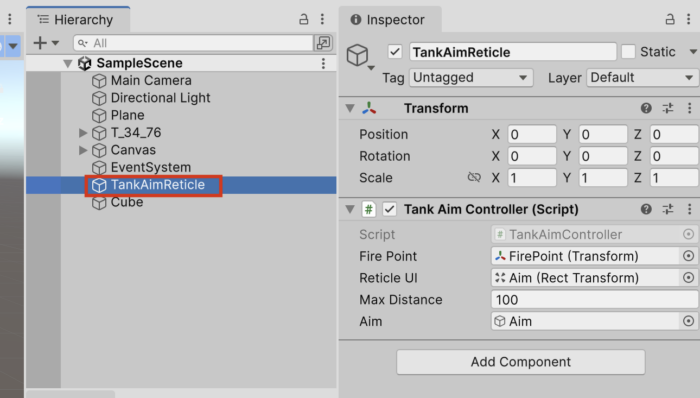
(2025年12月8日)
<BOSSのHPによって、表示、非表示が切り替わる>
using System.Collections;
using System.Collections.Generic;
using UnityEngine;

public class Boss : MonoBehaviour
{
    //public GameObject body;
    public GameObject effectPrefab;
    public GameObject effectPrefab2;
    public int objectHP;

    public float shotSpeed;
    public GameObject[] enemyShellPrefabs;
    public AudioClip shotSound;
    private int count;

    public GameObject target;
    private float dis;
    private int num = 0;
    public MeshRenderer mesh;


    private void Update()
    {
        if (target)
        {
            dis = Vector3.Distance(transform.position, target.transform.position);
            if (dis < 50)
            {
                transform.LookAt(target.transform);
            }
        }
        count += 1;
        if (count % 100 == 0)
        {
            num = (num + 1) % 3;
            if (num == 0 || num == 1)
            {
                GameObject enemyShell = Instantiate(enemyShellPrefabs[0], transform.position, Quaternion.identity);
                Rigidbody enemyShellRb = enemyShell.GetComponent();
                enemyShellRb.AddForce(transform.forward * shotSpeed);
                AudioSource.PlayClipAtPoint(shotSound, transform.position);
                Destroy(enemyShell, 3.0f);
            }
            else
            {
                GameObject enemyShell = Instantiate(enemyShellPrefabs[1], transform.position, Quaternion.Euler(90, 0, 0));
                //Rigidbody enemyShellRb = enemyShell.GetComponent();
                //enemyShellRb.AddForce(transform.forward * shotSpeed);
                AudioSource.PlayClipAtPoint(shotSound, transform.position);
                Destroy(enemyShell, 3.0f);
            }
        }

        // ★12月8日追加
        if(objectHP >= 6)
        {
            mesh.enabled = true;
        }
    }

    private void OnTriggerEnter(Collider other)
    {
        // (ポイントメモ)ミサイルがあった時にしか実行されない。
        if (other.CompareTag("Missile"))
        {
            objectHP -= 1;

            // ★12月8日改良
            if (objectHP <= 2) { mesh.enabled = false; } // ★12月8日削除 /* if (objectHP == 6) { print("ok"); mesh.enabled = true; print("ok12"); } */ if (objectHP > 0)
            {
                Destroy(other.gameObject);
                GameObject effect = Instantiate(effectPrefab, transform.position, Quaternion.identity);
                Destroy(effect, 2.0f);
            }
            else
            {
                Destroy(other.gameObject);
                GameObject effect2 = Instantiate(effectPrefab2, transform.position, Quaternion.identity);
                Destroy(effect2, 2.0f);
                Destroy(this.gameObject);
            }
        }
    }
    public void AddHP()
    {
        objectHP += 1;
    }
}
(2025年11月3日)
<敵を破壊したら一時停止になるエラーの修正>
MoveEnemyAから下記スクリプトを削除すればOK
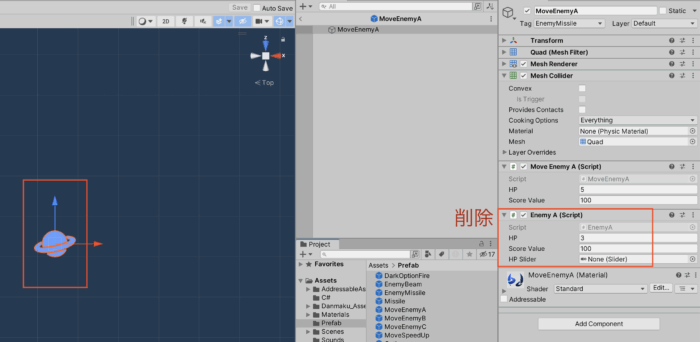
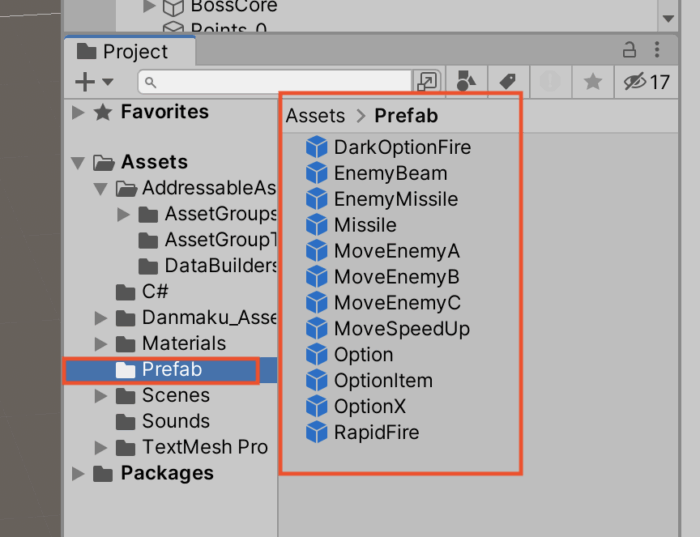
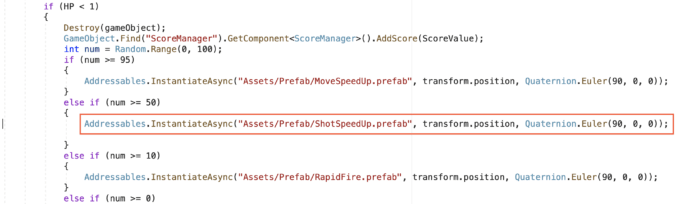
<ShotSpeedUpアイテムがプレハブフォルダに存在しない>

(2025年7月28日)
<4個のバリアを破壊したらボスにダメージが入るようになる>
・「DestroyBoss」スクリプトの改良
using System.Collections;
using System.Collections.Generic;
using UnityEngine;

public class DestroyBoss : MonoBehaviour
{
    public GameObject effectPrefab;
    public GameObject effectPrefab2;
    public int objectHP;
    public GameObject itemPrefab;
    public int scoreValue;
    public int damage = 1;
    private ScoreManager sm;

    // ★変更はここだけ!(publicに変更)
    public bool barrier = true;

    private void Start()
    {
        sm = GameObject.Find("ScoreLabel").GetComponent<ScoreManager>();
    }

    private void OnTriggerEnter(Collider other)
    {
        if (barrier == true)
        {
            return;
        }

        if (other.CompareTag("Shell"))
        {
            objectHP -= damage;

            if (objectHP > 0)
            {
                Destroy(other.gameObject);
                GameObject effect = Instantiate(effectPrefab, other.transform.position, Quaternion.identity);
                Destroy(effect, 2.0f);
            }
            else
            {
                sm.AddScore(scoreValue);
                Destroy(other.gameObject);
                GameObject effect2 = Instantiate(effectPrefab2, other.transform.position, Quaternion.identity);
                Destroy(this.gameObject);

                if (itemPrefab)
                {
                    Vector3 pos = transform.position;
                    Instantiate(itemPrefab, new Vector3(pos.x, pos.y + 0.6f, pos.z), Quaternion.identity);
                }
            }
        }
    }
}
・新規にC#スクリプトの作成
・名前を「GameController」に変更
・下記のコードを書いてチェック
using System.Collections;
using System.Collections.Generic;
using UnityEngine;

public class GameController : MonoBehaviour
{
    private GameObject[] barriers;
    public GameObject bossBariier;
    public DestroyBoss destroyBoss;
    public AudioClip sound;
    private bool isOk = false;

    void Update()
    {
        barriers = GameObject.FindGameObjectsWithTag("Barrier.");

        if (barriers.Length == 0)
        {
            if(isOk)
            {
                return;
            }

            // ボスのバリアを破壊する
            Destroy(bossBariier.gameObject);

            // ボスにダメージが入るようにする
            destroyBoss.barrier = false;

            // バリアが壊れる音を出す
            AudioSource.PlayClipAtPoint(sound, Camera.main.transform.position);

            isOk = true;
        }
    }
}
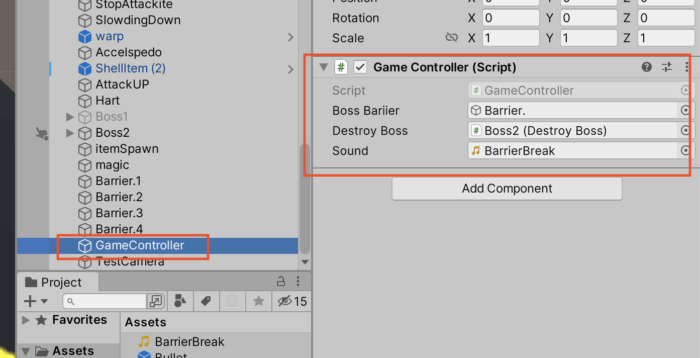
・新規にCreate Emptyオブジェクトを作成
・名前を「GameController」に変更
・これにスクリプトを追加
・下記3つの設定を行う
・Boss Barrierの空欄にはBoss2の中にある「Barrier.」オブジェクトを追加
・Destroy Bossの空欄には「Boss2」オブジェクトを追加
・Soundの空欄には「バリアが壊れる音」を追加
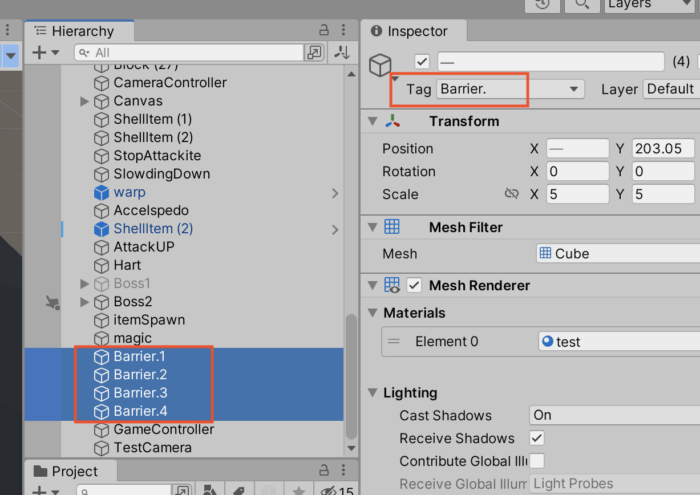
・タグの設定
(2025年3月3日)
<Keyオブジェクトに触れると、5秒間だけ無限ジャンプが可能になる>
using System.Collections;
using System.Collections.Generic;
using UnityEngine;
using UnityEngine.SceneManagement;
public class Boll : MonoBehaviour
{
public float moveSpeed;
private Rigidbody rb;
public AudioClip coinGet;
public float jumpSpeed;
private bool isjumping = false;
private int coinCount = 0;
private Vector3 pos;
public GameObject[] coinIcons;
public GameObject key;
public AudioClip keysound;
// ★追加(無限ジャンプ)
private bool isMugen = false;
void Start()
{
rb = GetComponent();
}
void Update()
{
pos = transform.position;
if (pos.y < -10)
{
SceneManager.LoadScene("GameOver");
}
float moveH = Input.GetAxis("Horizontal");
float moveV = Input.GetAxis("Vertical");
Vector3 movement = new Vector3(moveH, 0, moveV);
rb.AddForce(movement * moveSpeed);
if (Input.GetButtonDown("Jump") && isjumping == false)
{
rb.velocity = Vector3.up * jumpSpeed;
// ★追加(無限ジャンプ)
if (isMugen == false)
{
isjumping = true;
}
}
}
private void OnTriggerEnter(Collider other)
{
if (other.CompareTag("Coin"))
{
Destroy(other.gameObject);
AudioSource.PlayClipAtPoint(coinGet, Camera.main.transform.position);
coinCount += 1;
coinIcons[coinCount - 1].SetActive(false);
if (coinCount == 1)
{
key.SetActive(true);
AudioSource.PlayClipAtPoint(keysound, Camera.main.transform.position);
}
if (coinCount == 3)
{
SceneManager.LoadScene("GameClear");
}
}
//キーというタグに触れたら無限ジャンプできる
if (other.CompareTag("Key"))
{
// ★変更(無限ジャンプ)
Destroy(other.gameObject);
isMugen = true;
// ボールの色を黒に変える
this.gameObject.GetComponent<MeshRenderer>() .material.color = Color.black;
Invoke("ResetMugen", 5f); // 5秒間だけ無限ジャンプできる
}
}
private void OnCollisionEnter(Collision collision)
{
if (collision.gameObject.CompareTag("Floor"))
{
isjumping = false;
}
}
// ★追加(無限ジャンプ)
void ResetMugen()
{
isMugen = false;
// ボールの色を緑に戻す
this.gameObject.GetComponent<MeshRenderer>() .material.color = Color.green;
}
}